> ## Documentation Index
> Fetch the complete documentation index at: https://bruno-a6972042-mintlify-c74cb75a.mintlify.site/llms.txt
> Use this file to discover all available pages before exploring further.
# Environment Variables
Environment variables are variables that are scoped to an environment, such as local development or production. They are useful for storing variables that can be re-used across the collection that are different depending on the environment. An example would be the host url of the server you want to test.
## Creating an Environment Variable
1. Go to environments (top right) and press **No environment**.
2. If there are no environments, you will be prompted to create one.
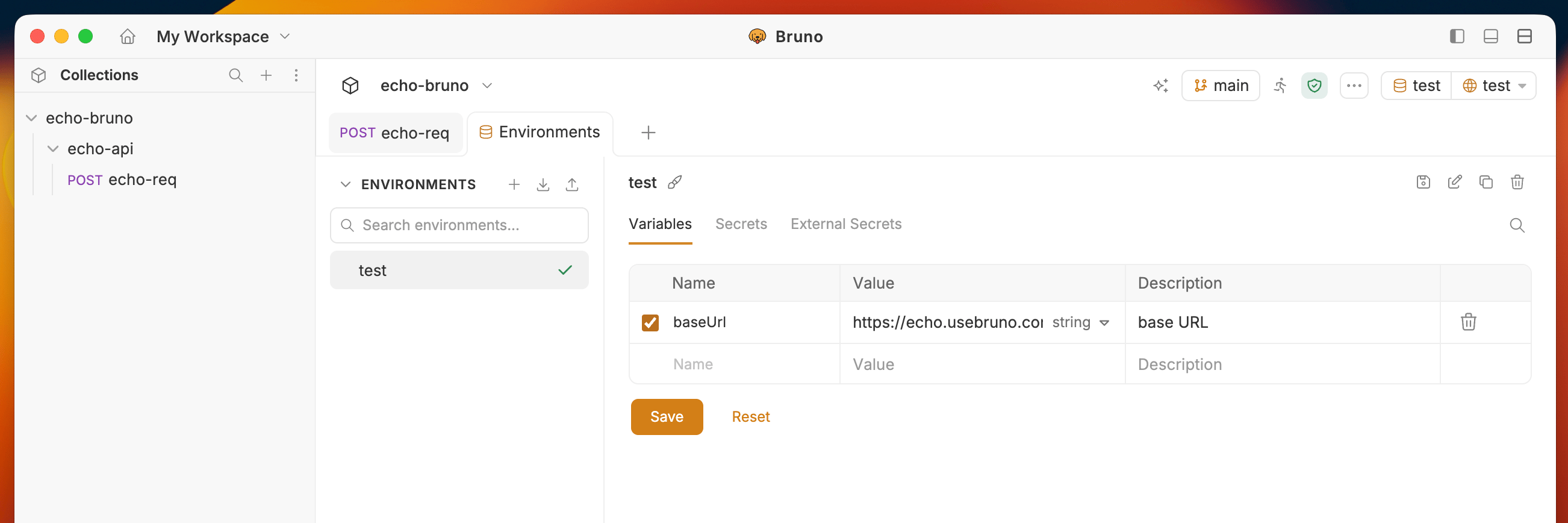
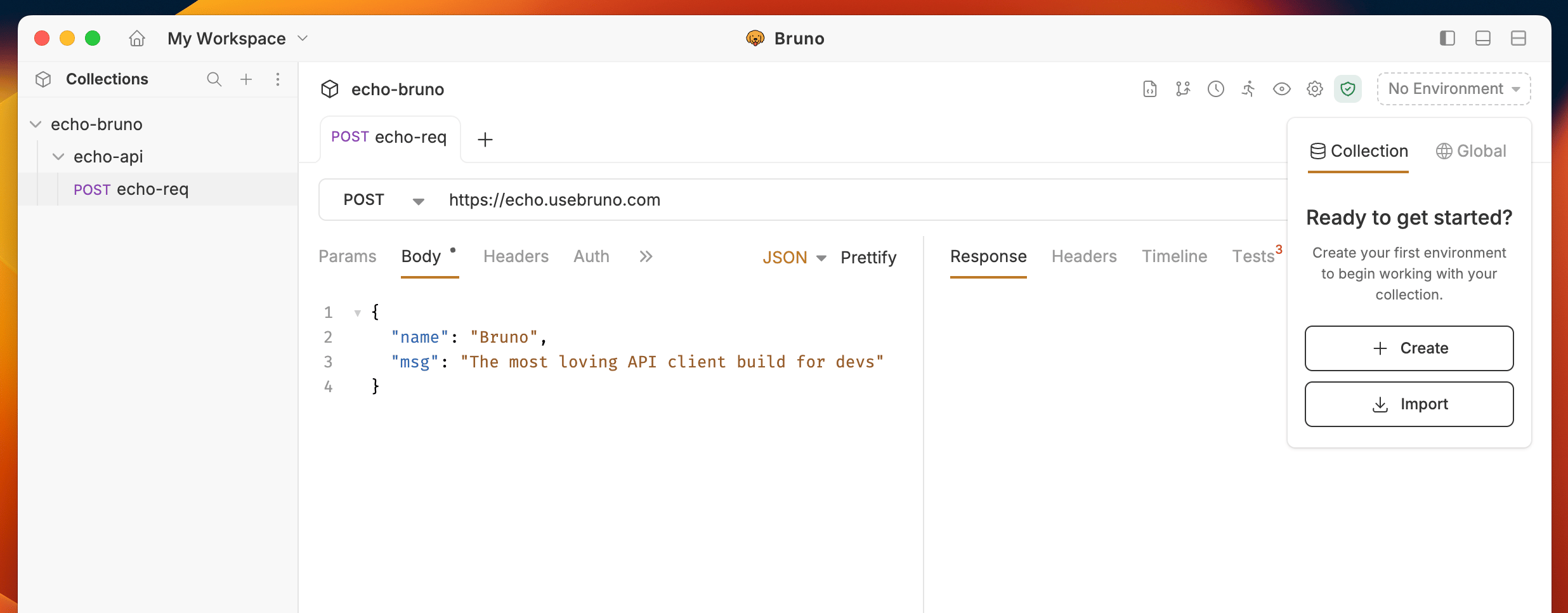 3. Add your variable name, value, and an optional description for what the variable represents.
4. Save your changes.
3. Add your variable name, value, and an optional description for what the variable represents.
4. Save your changes.
 ## Using an Environment Variable
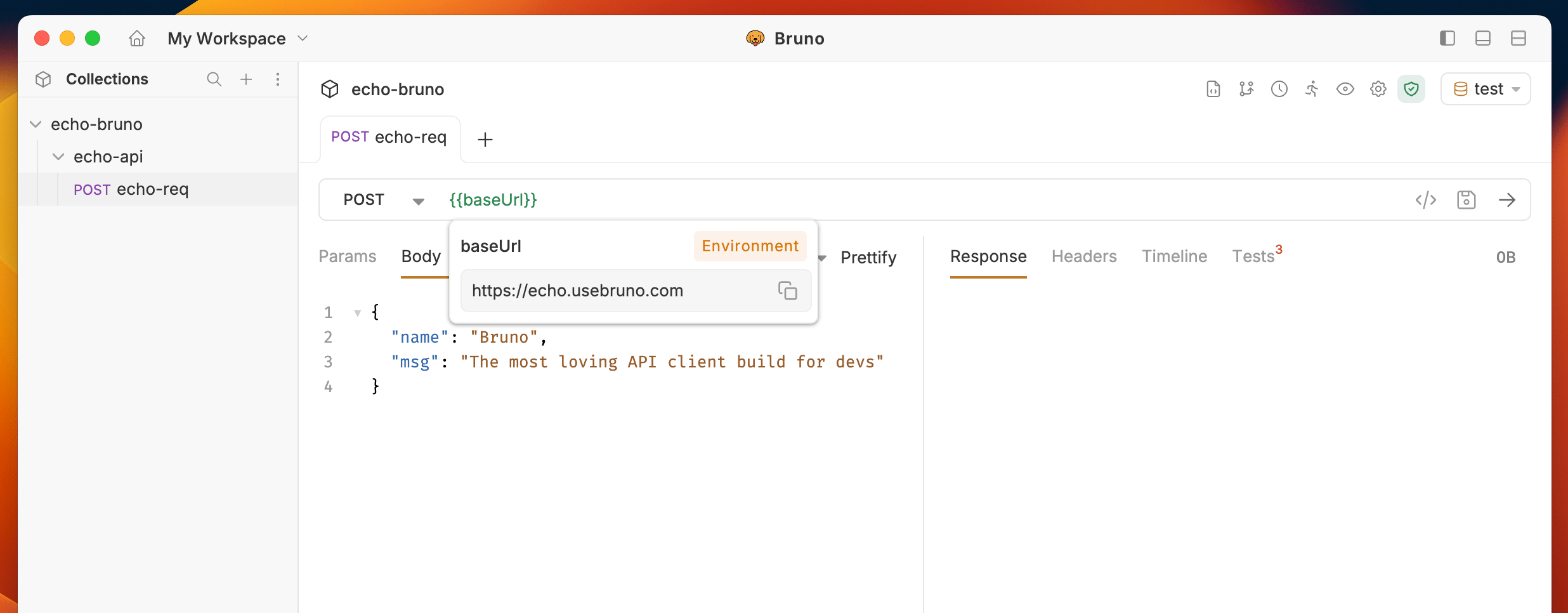
Just like other variables you can use the `{{varName}}` syntax to use an environment variable in a request. On the top-right, you can see which environment you are currently using and select a different one.
## Using an Environment Variable
Just like other variables you can use the `{{varName}}` syntax to use an environment variable in a request. On the top-right, you can see which environment you are currently using and select a different one.
 ## Searching environment variables
When working with a large number of environment variables, you can use the search feature to quickly find specific variables.
1. Open your environment settings.
2. Click the search icon in the environment details panel.
3. Type your query to filter variables by name or value.
The search filters the variable list in real time. If you click on a variable row while searching, that row stays visible even if it no longer matches the query, so you can edit it without losing your place. The row unpins automatically after a short delay.
The search feature is also available for [global environment variables](/variables/global-environment-variables).
## Using the ./environment directory
Environment variables are synced with the `/environments` directory inside your collection. You can also create and manage environments there.
Each environment is saved in a `.bru` file or a `.yml` file depending on the format in use.
**BRU format** (`local.bru`)
```bash theme={null}
vars {
@description('''Base URL for the local server''')
host: http://localhost:8787
@description('''
JWT token obtained after login.
Expires in 24 hours.
''')
token: abc123
noDesc: plain-value
}
```
Use `@description` before a variable to document what it represents. Descriptions are optional, always go on the line immediately before the variable, and support multiline text using triple quotes (`'''`).
**YAML format** (`production.yml`)
```yaml theme={null}
name: Production
variables:
- name: host
value: https://api.example.com
enabled: true
secret: false
description: Single-line description
- name: token
value: abc123
enabled: true
secret: false
description: |-
Multiline description.
Supports multiple lines.
Third line here.
- name: apiKey
value: ''
enabled: true
secret: true
description: Secret API key stored encrypted
- name: disabledVar
value: old-value
enabled: false
secret: false
description: This variable is disabled
- name: ''
value: ''
enabled: true
secret: false
description: Orphaned description becomes an empty-name row
```
The `description` field is optional. Use the block scalar `|-` for multiline descriptions to preserve line breaks. A variable with an empty `name` and `value` is treated as an orphaned description row in the UI.
For information on importing and exporting environment variables, see the [Import/Export Environments](/import-export-data/import-export-environments) guide.
## Searching environment variables
When working with a large number of environment variables, you can use the search feature to quickly find specific variables.
1. Open your environment settings.
2. Click the search icon in the environment details panel.
3. Type your query to filter variables by name or value.
The search filters the variable list in real time. If you click on a variable row while searching, that row stays visible even if it no longer matches the query, so you can edit it without losing your place. The row unpins automatically after a short delay.
The search feature is also available for [global environment variables](/variables/global-environment-variables).
## Using the ./environment directory
Environment variables are synced with the `/environments` directory inside your collection. You can also create and manage environments there.
Each environment is saved in a `.bru` file or a `.yml` file depending on the format in use.
**BRU format** (`local.bru`)
```bash theme={null}
vars {
@description('''Base URL for the local server''')
host: http://localhost:8787
@description('''
JWT token obtained after login.
Expires in 24 hours.
''')
token: abc123
noDesc: plain-value
}
```
Use `@description` before a variable to document what it represents. Descriptions are optional, always go on the line immediately before the variable, and support multiline text using triple quotes (`'''`).
**YAML format** (`production.yml`)
```yaml theme={null}
name: Production
variables:
- name: host
value: https://api.example.com
enabled: true
secret: false
description: Single-line description
- name: token
value: abc123
enabled: true
secret: false
description: |-
Multiline description.
Supports multiple lines.
Third line here.
- name: apiKey
value: ''
enabled: true
secret: true
description: Secret API key stored encrypted
- name: disabledVar
value: old-value
enabled: false
secret: false
description: This variable is disabled
- name: ''
value: ''
enabled: true
secret: false
description: Orphaned description becomes an empty-name row
```
The `description` field is optional. Use the block scalar `|-` for multiline descriptions to preserve line breaks. A variable with an empty `name` and `value` is treated as an orphaned description row in the UI.
For information on importing and exporting environment variables, see the [Import/Export Environments](/import-export-data/import-export-environments) guide.